Archives

Archives / 2012
  • How to host website in the Windows Azure Virtual Machine

    431 comments

    How to host website in the Windows Azure Virtual Machine

    Well as you know Microsoft is now offering IaaS (Infrastructure as a service) services through the new Virtual Machine role.

    It’s quite good and easy to get up and running with it but. In matter of minutes you can have your windows or linux virtual machine ready to be used. You can shut them off or backup their VHDs.

    When I gave it a go to try it, the very first thing I wanted to do was to host a website on my VM. So once the VM was ready I remote deskoped in and added IIS and the other stuff. But when I tried to browse the site I got a 404 (page not found) error in the browser.

    I spent some time figuring out what has gone wrong and finally came to know that by default there is

    clip_image002

    just one endpoint enabled for the VM and that’s used for remote desktop.

    So bingo I had to log into my windows azure control panel and added a new endpoint for port 80 (http) and 443 (https).

    clip_image004

    clip_image006

    clip_image008

    And that fixed the problem.

    Written by vahid

    Saturday, September 15, 2012 at 5:30 AM

  • Challenges in switching to Agile/Scrum

    2462 comments

    there is no doubt that agile practices specially scrum is pretty popular these days. This is not because scrum is something funky to have but rather because it really works and works very well. i know what you are saying now… Smile you would be saying but hold on i have seen some companies/projects which started to switch to scrum but they all ended up in tears and had to leave it half way.

    well i don't deny that. during my career i have been lucky to see some of those projects and i agree with you. but you know for me they all failed because they simply didn't know themself neither did they know scrum. i mean they didn't know their team culture –strengths and weaknesses-. They did not know how to bend the scrum practices to fit into their team culture either.

    i believe shifting to scrum is like getting married. you think you already know how you are going to deal with it but don't consider the fact that it’s total mind shift. specially in software industry up until few years ago everybody was pushing for ultra extra process/documented oriented methodologies like waterfall. and we spent a lot of time learning about all sort of documentation. You have to understand that adopting scrum is not one way adoption and is rather a two way one. meaning you need to bend scrum a bit to adopt it your team culture and you also  to bend the team culture to adopt the scrum.

    The team which fail to adopt scrum are the ones which go by book and start enforcing everything written in a scrum book the way they were imposing CMMI level 3 processes. the point they were missing was that those books were not holistic and they were just a set of guidelines. the people in charge missed the point that it cannot be done over a night. and they have got to shift gradually.

    if you are planning to shift to scrum i would suggest that you first start by teaching the team about scrum. tell them about the values it add and tell them that it’s a total mind shift from what they are doing. i am sure you will be getting comments like “For me agile/scrum is just like waterfall with shorter iterations” make sure you clarify with the team that IT IS NOT.

    Then you need to start picking up the scrum practices which are easier to adopt and less challenging like daily stand ups, shorter iterations. give it a go for a while and once the team feels comfortable with these. start adapting the other things like organized backlog review, proper planning meeting.

    The next step would be pushing the sprint commitment to the team members. make them understand that if the team commit to something for a sprint they don't have any choice but finishing it as a team.

    i would say this is the trickiest of all. because you would have to deal with cultural, technical and process related issues in this regards. Some developer simply don't get it that they have got to honour their sprint commitments and they keep coming up with excuses. you’ve got to fix this.

    Then you have to decide how you are going to deal with the Acceptance testing. do you want to do it in the same sprint? do want you want to let the QC team to stay one sprint behind the dev team? or do you want to treat them as two different teams? unfortunately there is no recipe for this and you’ve got to see what works well for you.

    The technical challenge you are going to have here is about writing a testable code and writing automated unit tests for the code. you have to note that having automated unit test IS A MUST in a successful scrum project. for me there is no excuse not to write unit tests. well i am not saying to start with TDD but whatever development methodologies you use, you need to write testable code and write unit tests for your code.

    writing testable code and unit tests is something that %99 of the developers think they know it but may be half of the actually know how do it.

    To write a testable code there are couple of patterns/concepts which are absolutely vital. for example separation of concern, dependency injection, MVC, MVVM etc. make sure you get enough training materials for your developers to understand these patterns/concepts.

    a Few years ago i used a technique which worked well for my team. basically i told my team to code without user interface and leave the user interface as the last task in each user story. so they had no other way of testing their code other than writing unit tests. that worked well.  for another team of mine i tried to show them that unit testing not only improves the code quality but also saves the developers a lot of time. like when they wanted to test a booking system they had to fire up the whole application fill out a few forms to reach to the booking page and then test what they wanted to test in that page. Ok if something was wrong they had to do it again. i showed them how they could automate the whole thing in unit test once and run the quickly whenever they want. this trick also worked pretty well.

    Now i encourage most of the companies to start adopting agile practices. and i am sure everybody will benefit from it. A very good example of adopting scrum is my current employer. The PMO office has done a very good job on bringing the scrum into the company with no dramas.

    Written by vahid

    Saturday, September 8, 2012 at 12:34 AM

    Tagged with ,

  • Cool Extension for Visual Studio 2010

    550 comments

    i have been using Power Commands for Visual Studio for a long time. but i had never noticed that it’s a got very good feature for automatically formatting the document on save. not only it can format the document, but also it can remove and sort using statements in the files when you save them.

    it this really good for me because we use stylecop to enforce coding standard within our dev team.

    it’s also good when you refactor your code and end up changing namespaces and class names.

    to install the extension. click on the extension manager in the option menu.

    then search for PowerCommands and select and install it from the list.

    image

    once the installation is done, click on tools then click on option menu.

    image


    from the options dialog box select PowerCommands and in the left hand side check the options you desire.

    image


    and you are good to go.

    Written by vahid

    Tuesday, May 29, 2012 at 8:51 PM

    Tagged with ,

  • How to flag system/image file types in Nintex Analytics 2010

    7334 comments

    When you are after some statistics in SharePoint, say number of user activities, you want to exclude activities on certain file types. For example we normally are not interested on activities on the webpart or xml file but we are rather interested in activities on docx or xlsx files.

    Nintex Analytics 2010 enables to mark the files that you normally want to exclude from your reports as either System file or Image file. it then gives you parameters in some reports to exclude activities on the file types which are flagged as system or image files from the result.

    this is a very powerful feature of  NA2010 which gives an extra flexibility to design and use your reports.

    in this video I show you how to flag various file types as either system or image file type.

    Written by vahid

    Thursday, May 3, 2012 at 5:55 AM

  • How to configure drill down report in Nintex Analytics 2010

    217 comments

    Time to time we need to be able to connect couple of report to make an end to end usage story of reports.

    Fortunately Nintex Analytics 2010 fully support drill down functionality and most of the out of the box report are configured to drill down to a related report.

    but if you need to configure your own custom report to drill down to a report, don’t worry it’s quite easy in NA2010.

    In this video I show you how you can configure drill down reports in few minutes.

    Written by vahid

    Thursday, May 3, 2012 at 5:44 AM

  • How to create a new report in Nintex Analytics 2010

    190 comments

    in this video I show you how to create a new report in Nintex Analytics 2010. I’ll show you:

    • how to select a dataset for your report
    • how to configure report parameters
    • How set the report name, description, icon and other properties
    • How to customize chart visualization
    • How to customize table visualization

    Written by vahid

    Thursday, April 26, 2012 at 6:35 AM

  • Nintex Analytics 2010 Out of the box reports-Sites&Pages

    166 comments

    in this video I walk you through the reports which are available out of the box in Sites&Reports category of Nintex Analytics 2010.

    Written by vahid

    Saturday, April 21, 2012 at 5:00 AM

  • How To Install Nintex Analytics 2010

    157 comments

    one of the best thing about Nintex Analytics 2010 is the installation experience. like other Nintex products, the installation experience is fast and easy. you just need to let Nintex Analytics know a few settings and it will take care of the rest.

    in the following video I’ll show how to install Nintex Analytics 2010 on your environment.

    Written by vahid

    Wednesday, April 18, 2012 at 7:54 AM

  • How to trigger a Nintex Workflow from a Nintex Analytics report schedule

    1261 comments

    well we all know that Nintex Analytics provides a great insight to our SharePoint environments through the vast number of reports it provides out of the box.

    But how can we turn these information into some actions? the good news is that Nintex Analytics 2010 integrates well with Nintex Workflow which would enable us to make some decision and execute a set up process based on the outcome of a report.

    Nintex Analytics 2010 has got the capability to trigger a Nintex Workflow as part of report schedule. the report will pass all the information to the workflow and leaves it upto the workflow to take some action –if required- based on the data.

    for example there is report avaiable out of the box in Nintex Analytics 2010 called Content Storage by Site which displays total disk storage used by each site.

    image

    let’s say that in your organization a each site belongs to a department and IT department bills them based on their disk usage.

    to automate this you can easily create a workflow which generates and emails the bill for each department once the report schedule is ran.

    The workflow need to be a site workflow. so let’s create a Nintex Workflow called Bill Departments by clicking Site Actions => Nintex Workflow 2010 => Create Site Workflow. the next step is to define the variables that report will pass to the workflow.

    By default, the following five report columns will passed by the report to the workflow as a Workflow variable.

    · ScheduleInfo – The run schedule of the report e.g. Once per month

    · ReportID – The report ID

    · ScheduleStartTime – The start time of the schedule

    · ScheduleEndTime – The end time of the schedule

    · ExecutionID – The execution ID for the schedule that triggers the workflow

    And if you chose to run the workflow for each result, then report will prefix all the columns in the result with “ReportData” and passes them to the workflow as workflow variable. to find out what are columns available in the the report you can click the chart/table designer in the report design mode and then click on Data Settings tab. you will see all available columns in this tab.  for example our report has got the following columns:

    image

    If you chose to run the workflow for each result which we want so, then report will prefix all the columns in the result with “ReportData” and passes them to the workflow as workflow variable. for example the this report will pass the following parameters to the workflow:
    ReportDataSiteId, ReportDataWebId, ReportDataFiles, ReportDataFilesRelative, ReportDataSizeRelative, ReportDataSize etc..

    in this case we just need to use ReportDataSiteId and ReportDataSize. so we need to create a variable for each of them in the workflow:

    image

    Please note that, the name of the variable created in the workflow is case sensitive and should be ReportData followed by column name and NOT column display name.

    we can proceed and design our workflow using these two parameters. please note that the workflow will be executed per each record in the result which in this case is a site.

    once we are done with designing the workflow we need to publish it and make it ready to be triggered by the report schedule.

    let’s assume that you need to bill departments each month. so we would configure the report schedule to run first of each month

    image

    and that’s all we needed to do. next time the report schedule runs it will trigger the workflow for each record in the result of the report execution.

    Written by vahid

    Tuesday, April 17, 2012 at 1:53 AM

  • Using Unity with ASP.NET WEB API Controller

    518 comments

    Support for Ioc containers is backed into ASP.NET WEB API and uses the service locator pattern dependency resolver by default.

    the default service locator implements the IDependencyResolver interface. This interface has two methods.

    • GetService: Creates one instance of a specified type.
    • GetServices: Create a collection of objects of a specified type.

    in order to use Microsoft Unity framework with ASP.NET WEB API we need to map these to methods to Resolve and ResolveAll methods of Utity. to do so first add the following method to your global.asax.cs or your bootstrapper class

            Public static void RegisterDependencies(IUnityContainer container)
            {
     
                GlobalConfiguration.Configuration.ServiceResolver.SetResolver(
                    t =>
                    {
                        try
                        {
                            return container.Resolve(t);
                        }
                        catch (ResolutionFailedException)
                        {
                            return null;
                        }
                    },
                    t =>
                    {
                        try
                        {
                            return container.ResolveAll(t);
                        }
                        catch (ResolutionFailedException)
                        {
                            return new List<object>();
                        }
                    });
            }

    this is the method which maps the GetService and GetServices methods to Resolve and ResolveAll methods.

    the next and final step is to plug in this method to the framework. to do so you just need to call this method from the method in which you construct your unity container. in my case I create a separate method to take care of this:

            private static IUnityContainer BuildUnityContainer()
            {
                var container = new UnityContainer();
                RegisterMappers(container);
                RegisterDependencies(container);
                container.RegisterControllers();
                DependencyResolver.SetResolver(new UnityDependencyResolver(container));
                return container;
            }

    and you are done. you should be able to use your Ioc container with ASP.NET WEB API now.

    Written by vahid

    Saturday, April 14, 2012 at 5:40 PM

    Tagged with , ,

  • Hosting ASP.NET WEB API

    310 comments

    You may want to host you HTTP Service i.e. ASP.NET WEB API in a console app. well it can be easily done.

    to show this lets create a console app and add reference to the following assemblies:

    System.Web
    System.Web.Http
    System.Web.Http.Common
    System.Web.Http.SelfHost
    System.Web.Http.WebHost
    System.Net;
    System.Net.Http.Formatting;
    System.Net.Http.Headers;
     

    this step is optional but for just touching on Json.net I am going to install Json.net using Nuget.

    image


    Now lets add a CarInfo class to return it in our controller

       1:      public class CarInfo
       2:      {
       3:          private readonly DateTime releaseDate = DateTime.UtcNow;
       4:          private readonly Dictionary<int, string> availableColors = new Dictionary<int, string>  
       5:            {         
       6:            { 1, "yellow"},   
       7:            { 2, "red" },   
       8:            { 3, "black" }, 
       9:            };
      10:   
      11:          public string Name
      12:          {
      13:              get
      14:              {
      15:                  return "BMW X6";
      16:              }
      17:          }
      18:          public DateTime ReleaseDate { get { return releaseDate; } }
      19:          public IDictionary<int, string> AvailableColors { get { return availableColors; } }
      20:      }


    And let’s create our home controller as bellow:


       1:      public class HomeController : ApiController
       2:      {
       3:          // GET /api/<controller>
       4:          public CarInfo Get()
       5:          {
       6:              return new CarInfo();
       7:          }
       8:      }

    as you see our controller has got just one method which responds to the Get request.

    we also need a little helper class to integrate JSon.net to our application. please note as mentioned above using Json.net is optional.


      public class JsonNetFormatter : MediaTypeFormatter
        {
            private readonly JsonSerializerSettings jsonSerializerSettings;
     
            public JsonNetFormatter(JsonSerializerSettings jsonSerializerSettings)
            {
                this.jsonSerializerSettings = jsonSerializerSettings ?? new JsonSerializerSettings();
                SupportedMediaTypes.Add(new MediaTypeHeaderValue("application/json"));
                Encoding = new UTF8Encoding(false, true);
            }
     
            protected override bool CanReadType(Type type)
            {
                return type != typeof(IKeyValueModel);
            }
     
            protected override bool CanWriteType(Type type)
            {
                return true;
            }
     
            protected override Task<object> OnReadFromStreamAsync(Type type, Stream stream, 
    HttpContentHeaders contentHeaders, FormatterContext formatterContext)
            {
                var serializer = JsonSerializer.Create(this.jsonSerializerSettings);
     
                return Task.Factory.StartNew(() =>
                {
                    using (var streamReader = new StreamReader(stream, Encoding))
                    {
                        using (var jsonTextReader = new JsonTextReader(streamReader))
                        {
                            return serializer.Deserialize(jsonTextReader, type);
                        }
                    }
                });
            }
     
            protected override Task OnWriteToStreamAsync(Type type, object value, Stream stream, 
    HttpContentHeaders contentHeaders, FormatterContext formatterContext, TransportContext transportContext)
            {
                var serializer = JsonSerializer.Create(this.jsonSerializerSettings);
     
                return Task.Factory.StartNew(() =>
                {
                    using (var jsonTextWriter = 
    new JsonTextWriter(new StreamWriter(stream, Encoding)) { CloseOutput = false })
                    {
                        serializer.Serialize(jsonTextWriter, value);
                        jsonTextWriter.Flush();
                    }
                });
            }
        }

    ok it’s time to create actual host to host our service. you just need to add few lines of code to the main method of the program

            static void Main(string[] args)
            {
                // Set up server configuration    
                HttpSelfHostConfiguration config = new HttpSelfHostConfiguration("http://localhost:8081");
                config.Routes.MapHttpRoute("Default", "{controller}", new { controller = "Home" });
     
               
                JsonSerializerSettings serializerSettings = new JsonSerializerSettings();
                serializerSettings.Converters.Add(new IsoDateTimeConverter());
                config.Formatters[0] = new JsonNetFormatter(serializerSettings);
     
                // Create server   
                var server = new HttpSelfHostServer(config);
     
                // Start listening   
                server.OpenAsync().Wait();
                Console.ReadLine();
            }

    to test the application open Fiddler and create a request as below:

    image

    basically you need to set the address to http://localhost:8081/Home and content-type to Content-Type: application/json; charset=utf-8. once you create the request click on execute and you should be getting the following response back

    image

    as you see we get Json representation of the CarInfo object.

    it was quit simple, wasn’t it?

    Written by vahid

    Sunday, March 18, 2012 at 4:26 AM

    Tagged with ,

  • SQL syntax formatter

    1436 comments

    Well it’s really pity that neither VS2010 nor SQL development studio provide SQL syntax formatter. but anyway there good news is that there are sites like http://www.tsqltidy.com  out there which would this for you for free.

    but that was not enough for me. i wanted to have tool with me to do this even when i am not connected to the internet–although does not happen that often Winking smile -

    Since i use Notepad++ as my text editor, i tought there might be a plug in for it. so searching online i found T-SQL formatter plug in.

    it’s not still a perfect formatter but in almost 90% of the times it’s done a great job for me.

    so if you also need a SQL formatter you may want to try this.

    To install it, open Notepad++, click on Plugins Menu and from the Plugin Manager menu click on Mange Plugins sub menu.

    image

    then from the Plugin Manager dialog box, select Poor Man’s T_Sql Formatter can click on install

    image

    it will ask you to restart the application click yes and next time you run Notepad++ you’ll have good SQL formatter plugin installed:

    image

    Written by vahid

    Thursday, March 15, 2012 at 9:27 PM

    Tagged with ,

  • Invisible character when parsing DateTime

    171 comments

    Today we faced a crazy situation. we have a piece of code in one of our applications which parses date and time value entered into a text box. Being lazy/smart developers we normally copy paste the sample value from the help file in order to test it. but crazy part was that when we copy paste it, .net could not parse the value throwing exception saying that the string was not in correct format. but if we typed exactly the same value it would work! aha let me copy paste both values into notepad and compare them char by char. ok they are exactly the same.

    to cut the story short after spending some times on the issue we noticed that there is an invisible character at the beginning of the value copied from the help file. then we quickly created a console app to get the char code of the character. and yes that’s a valid unicode character with 8203 code called “Zero Width Space (U+200B)”.

    having found the problem we could easily fix our help files and remove this character from them.

    here is the small piece of code to remove the Zero Width Space character from a string.

       1: string pattern = @"\u200B";
       2: Regex regex = new Regex(pattern);
       3: var matches = regex.Matches(content);
       4: Console.WriteLine("Found {0} Matches", matches.Count);
       5: content = regex.Replace(content, "");

    Hope this saves you some time in future.

    Written by vahid

    Wednesday, March 14, 2012 at 2:56 PM

    Tagged with

  • Make a call to a JSON/XML ASP.Net WEB API from server code

    913 comments

    There is plenty of articles out there on how to make a ajax call to a asp.net web api service. but what if you want to make a call to the same service from a server code? this can happen because of various reasons like when you want to offer a service and use IP validation.

    anyway this is quite simple to call a service exposed by ASP.net WEB API either using JSON or XML. and it is like calling a WCF or XML web service from a server side code without adding a reference to the service.

    Lets assume that our ASP.net WEB API provide a service to and and return flights using a given FlightSearchRequest object.

    FlightSearchRequest

     1:     public class FlightSearchRequest
     2:     {
     3:         public string DepartureAirportCode { get; set; }
     4:  
     5:         public string ArrivalAirportCode { get; set; }
     6:     }

    WEB API Method

     1:         [HttpPost]
     2:         public IEnumerable<Flight> GetFlights(FlightSearchRequest flightRequest)
     3:         {
     4:  
     5:             return new List<Flight>
     6:                 {
     7:                     new Flight { Id=1, AirlineCode = "EK", Price = 350 }, 
     8:                     new Flight { Id=2, AirlineCode = "LX", Price = 280 },
     9:                 };
     10:         }

    and here is the code to call the service:

    Using JSON

     1:             HttpWebRequest request;
     2:             HttpWebResponse hwResponse;
     3:             string url = "http://127.0.0.1:26030/api/MyAPI/GetFlights";
     4:             string responseBody = string.Empty;
     5:             string requestBody = 
    			"[{\"DepartureAirportCode\":\"MEL\",\"ArrivalAirportCode\":\"LHR\"}]";
     6:            
     7:                 byte[] byteData = UTF8Encoding.UTF8.GetBytes(requestBody.ToString());
     8:                 request = (HttpWebRequest)HttpWebRequest.Create(url);
     9:                 request.ContentType = "application/json;charset=utf-8";
     10:                 request.UserAgent = 
    	"Mozilla/5.0 (compatible; MSIE 9.0; Windows NT 6.1; WOW64; Trident/5.0; BOIE9;ENUS)";
     11:                 request.Accept = "*/*";
     12:                 request.Method = "POST";
     13:                 request.ContentLength = byteData.Length;
     14:                 
     15:                 // Write data 
     16:                 using (Stream postStream = request.GetRequestStream())
     17:                 {
     18:                     postStream.Write(byteData, 0, byteData.Length);
     19:                 }
     20:  
     21:                 // Get response 
     22:                 using (HttpWebResponse response = request.GetResponse() as HttpWebResponse)
     23:                 {
     24:                     // Get the response stream 
     25:                     using (var reader = new StreamReader(response.GetResponseStream()))
     26:                     {
     27:                         responseBody = reader.ReadToEnd();
     28:                     }
     29:                 }


    to make the same call using XML you just need to change the ContentType to application/xml and also change the request body to an xml format

    Using XML

     1:             HttpWebRequest request;
     2:             HttpWebResponse hwResponse;
     3:             string url = "http://127.0.0.1:26030/api/MyAPI/GetFlights";
     4:             string responseBody = string.Empty;
     5:             string requestBody = 
    				"<Product><Id>6</Id><Name>Jackson</Name></Product>";         
     6:                 byte[] byteData = UTF8Encoding.UTF8.GetBytes(requestBody.ToString());
     7:                 request = (HttpWebRequest)HttpWebRequest.Create(url);
     8:                 request.ContentType = "application/xml;charset=utf-8";
     9:                 request.UserAgent = 
    	"Mozilla/5.0 (compatible; MSIE 9.0; Windows NT 6.1; WOW64; Trident/5.0; BOIE9;ENUS)";
     10:                 request.Accept = "*/*";
     11:                 request.Method = "POST";
     12:                 request.ContentLength = byteData.Length;
     13:                 
     14:                 // Write data 
     15:                 using (Stream postStream = request.GetRequestStream())
     16:                 {
     17:                     postStream.Write(byteData, 0, byteData.Length);
     18:                 }
     19:  
     20:                 // Get response 
     21:                 using (HttpWebResponse response = request.GetResponse() as HttpWebResponse)
     22:                 {
     23:                     // Get the response stream 
     24:                     using (var reader = new StreamReader(response.GetResponseStream()))
     25:                     {
     26:                         responseBody = reader.ReadToEnd();
     27:                     }
     28:                 }

    now the more I play with WEP API the more I like it Smile

    Written by vahid

    Sunday, March 11, 2012 at 7:25 PM

    Tagged with ,

  • ASP.Net WEB API VS WCF Service

    343 comments

    Well as soon as i heard and read about asp.net web api, i was very excited about it but in between i had that mmmmm moment. i was like, this is great but what about WCF? I am not going to create any WCF services anymore?

    so I had think again about it but could not find any concrete answer as these two are overlapping in many areas. so I had to do a bit more R&D about the differences and I came across this blog post from Matt Milner.

    the post has got very fair point on when to use WCF services and when to use ASP.net web api. but in nutshell I think for most of our feature service development for web –over http-, we are going to use ASP.net web api and it kind of make sense as it’s much easier to setup and use.

    here is blog post address:

    http://mattmilner.com/Milner/Blog/post/2012/02/28/WebAPI-or-WCF.aspx

    Written by vahid

    Sunday, March 11, 2012 at 5:00 AM

    Tagged with , ,

  • The Visual Studio 2011 Fakes Framework

    372 comments

    I was just reading this blog post about Unit Testing Improvement in Visual Studio 2011 and noticed that there is something new called Fakes Framework.

    I didn’t get it first time so I had to read it again and also had to read this MSDN article to get my head around it. I mean I was getting so excited about it that I had to read it twice to make sure I have understood it properly. then I went like wow that’s great. now I can test old SharePoint code without TypeMock. Smile

    basically according to MSDN there are two new feature in the Fakes Framework:

    Stub

    types Stub types make it easy to test code that consumes interfaces or non-sealed classes with overridable methods. A stub of the type T provides a default implementation of each virtual member of T, that is, any non-sealed virtual or abstract method, property, or event. The default behavior can be dynamically customized for each member by attaching a delegate to a corresponding property of the stub. A stub is realized by a distinct type which is generated by the Fakes Framework. As a result, all stubs are strongly typed.

    Although stub types can be generated for interfaces and non-sealed classes with overridable methods, they cannot be used for static or non-overridable methods. To address these cases, the Fakes Framework also generates shim types.

    Shim

    types Shim types allow detouring of hard-coded dependencies on static or non-overridable methods. A shim of type T can provide an alternative implementation for each non-abstract member of T. The Fakes Framework will redirect method calls to members of T to the alternative shim implementation. The shim types rely on runtime code rewriting that is provided by a custom profiler.

    according to the blog post mentioned above the Stubs are not like Mocking framework but I am still not sure why I would need a Mocking framework when I can use Stub feature! will spend some more time on this and will update this post.

    but the Wow part for me was the Shim. it seems Microsoft Pex and Molls has given the required motivation for the VS team to include the Shim feature. it has always been a very difficult task to test non abstract classes like the ones provided in SharePoint. even using TypeMock or Pex was not an easy task.

    but Shim sounds very promising. although the syntax is not still quite easy to use-or at least I have not figured it out in last few hours- but it’s a great start.

    here is a small code sample which should throw an Application Exception if it’s first day of year 2000.


       1:  public static class Y2KChecker {
       2:      public static void Check() {
       3:          if (DateTime.Now == new DateTime(2000, 1, 1))
       4:              throw new ApplicationException("y2kbug!");
       5:      }
       6:  }


    lets say we want to make sure that the following code will throw an Application Exception if current date is 01/01/2000.  but to test this we need to provide an alternative implementation for DateTime.Now as DateTime.Now will always return current system date and time which would never satisfies the if condition.

    as you know we cannot Mock DateTime.Now with mocking framework and here is where Shim comes to picture to provide an alternative return value for DateTime.Now:

       1:  using (ShimsContext.Create()
       2:      // hook delegate to the shim method to redirect DateTime.Now
       3:      // to return January 1st of 2000
       4:      ShimDateTime.NowGet = () => new DateTime(2000, 1, 1);
       5:      Y2KChecker.Check();
       6:  }


    now I see the light at the end of all those old SharePoint code which are dying to be unit tested.

    Written by vahid

    Saturday, March 10, 2012 at 3:11 AM

    Tagged with ,

  • ASP.NET Web API

    236 comments

    I am a huge fan of Ajax. If you want to create a great experience for the users of your website – regardless of whether you are building an ASP.NET MVC or an ASP.NET Web Forms site — then you need to use Ajax. Otherwise, you are just being cruel to your customers.

    Most of the new websites expose data from the server as JSON and use jQuery to retrieve and update that data from the browser.

    One challenge, when building an ASP.NET website, is deciding on which technology to use to expose JSON data from the server. For example, how do you expose a list of products from the server as JSON so you can retrieve the list of products with jQuery? You have a number of options (too many options) including ASMX Web services, WCF Web Services, ASHX Generic Handlers, WCF Data Services, and MVC controller actions.

    With the release of ASP.NET 4 Beta, Microsoft has introduced a new technology for exposing JSON from the server named the ASP.NET Web API. You can use the ASP.NET Web API with both ASP.NET MVC and ASP.NET Web Forms applications.

    Create a Web API Controller

    to create a new web API controller you just need to select template as API Controller

    image

    this would create a class with default empty methods to get you started. 

    to test this lets create a new class called Product to send data back to JavaScript:
       1:      public class Product
       2:      {
       3:          public int Id { get; set; }
       4:   
       5:          public string Name { get; set; }
       6:   
       7:      }
     
    and let’s update the controller method as below for testing:
     
       1:      public class MyAPIController : ApiController
       2:      {
       3:          // GET /api/myapi
       4:          public IEnumerable<Product> Get()
       5:          {
       6:              return new List<Product>
       7:                  {
       8:                      new Product { Id = 1, Name = "Product1" }, 
       9:                      new Product { Id = 2, Name = "Product2" },
      10:                  };
      11:          }
      12:   
      13:          // GET /api/myapi/5
      14:          public Product Get(int id)
      15:          {
      16:              return new Product { Id = 3, Name = "Product3" };
      17:          }
      18:   
      19:          // POST /api/myapi
      20:          public HttpResponseMessage<Product> Post(Product newProduct)
      21:          {
      22:              newProduct.Id = 23;
      23:              var response = new HttpResponseMessage<Product>(newProduct, HttpStatusCode.Created);
      24:              var relativePath = "/api/movie/" + newProduct.Id;
      25:              response.Headers.Location = new Uri(Request.RequestUri, relativePath);
      26:              return response;
      27:          }
      28:   
      29:          // PUT /api/myapi/5
      30:          public void Put(int id, Product productToUpdate)
      31:          {
      32:              if (productToUpdate.Id == 1)
      33:              {
      34:                  // Update the movie in the database        
      35:                  return;
      36:              }
      37:              // If you can't find the movie to update   
      38:              throw new HttpResponseException(HttpStatusCode.NotFound);
      39:          }
      40:   
      41:          // DELETE /api/myapi/5
      42:          public HttpResponseMessage Delete(int id)
      43:          {
      44:              // Delete the movie from the database     // Return status code   
      45:              return new HttpResponseMessage(HttpStatusCode.NoContent);
      46:          }
      47:      }
     
    To use this ASP.net creates the following route in the global.asax
       1:              routes.MapHttpRoute(
       2:                  name: "DefaultApi",
       3:                  routeTemplate: "api/{controller}/{id}",
       4:                  defaults: new { id = RouteParameter.Optional }
       5:              );


    and let’s start using the Controller:

    Get Single Product

    To invoke the Get functions from JavaScript using JQuery you do the following:

       1:  <!DOCTYPE html>
       2:  <html xmlns="http://www.w3.org/1999/xhtml">
       3:  <head>
       4:      <title>Get product</title>
       5:  </head>
       6:  <body>
       7:      <div>
       8:          Title: <span id="Id"></span>
       9:      </div>
      10:      <div>
      11:          Director: <span id="Name"></span>
      12:      </div>
      13:      <script type="text/javascript" src="Scripts/jquery-1.6.2.min.js"></script>
      14:      <script type="text/javascript">
      15:          getProduct(1, function (product) {
      16:              $("#Id").html(product.Id);
      17:              $("#Name").html(product.Name);
      18:          });
      19:   
      20:          function getProduct(id, callback) {
      21:              $.ajax({ url: "/api/MyAPI", data: { Id: id }
      22:           , type: "GET",
      23:                  contentType: "application/json;charset=utf-8",
      24:                  statusCode:
      25:           {
      26:               200: function (product) { callback(product); },
      27:               404: function () { alert("Not Found!"); }
      28:           }
      29:              });
      30:          }     
      31:      </script>
      32:  </body>
      33:  </html>

    Get Multiple Products

       1:  <!DOCTYPE html>
       2:  <html xmlns="http://www.w3.org/1999/xhtml">
       3:  <head>
       4:      <title>Get product</title>
       5:  </head>
       6:  <body>
       7:      <div>
       8:          <span id="Products"></span>
       9:      </div>
      10:      <script type="text/javascript" src="Scripts/jquery-1.6.2.min.js"></script>
      11:      <script type="text/javascript">
      12:   
      13:          getProducts(function (products) {
      14:              var strproducts = "";
      15:              $.each(products, function (index, product) {
      16:                  strproducts += "<div>" + product.Name + "</div>";
      17:              });
      18:              $("#Products").html(strproducts);
      19:          });
      20:               function getProducts(callback) {
      21:               $.ajax(
      22:               {
      23:                  url: "/api/MyAPI/",                
      24:                  data: {},
      25:                  type: "GET",
      26:                  contentType: "application/json;charset=utf-8",            
      27:               }).then(function(products){                
      28:                  callback(products);
      29:               });        
      30:               }
      31:      </script>
      32:  </body>
      33:  </html>


    Insert a new Product

       1:  <!DOCTYPE html>
       2:  <html xmlns="http://www.w3.org/1999/xhtml">
       3:  <head>
       4:      <title>Create product</title>
       5:  </head>
       6:  <body>
       7:      <script type="text/javascript" src="Scripts/jquery-1.6.2.min.js"></script>
       8:      <script type="text/javascript">
       9:          var productToCreate = {Id: "4", Name: "Product4" };
      10:         
      11:          createproduct(productToCreate, function (newproduct) {
      12:              alert("New product created with an Id of " + newproduct.Id);
      13:          });
      14:   
      15:          function createproduct(productToCreate, callback) {
      16:              $.ajax({
      17:                  url: "/api/MyAPI",
      18:                  data: JSON.stringify(productToCreate),
      19:                  type: "POST",
      20:                  contentType: "application/json;charset=utf-8",
      21:                  statusCode: {
      22:                      201: function (newproduct) {
      23:                          callback(newproduct);
      24:                      }
      25:                  }
      26:              });
      27:          }     
      28:      </script>
      29:  </body>
      30:  </html>

    Update a Product


       1:  <!DOCTYPE html>
       2:  <html xmlns="http://www.w3.org/1999/xhtml">
       3:  <head>
       4:      <title>Put product</title>
       5:  </head>
       6:  <body>
       7:      <script type="text/javascript" src="Scripts/jquery-1.6.2.min.js"></script>
       8:      <script type="text/javascript">
       9:          var productToUpdate = { id: 1, title: "Product5" };
      10:          updateproduct(productToUpdate, function () {
      11:              alert("product updated!");
      12:          });
      13:          function updateproduct(productToUpdate, callback) {
      14:              $.ajax({
      15:                  url: "/api/MyAPI",
      16:                  data: JSON.stringify(productToUpdate),
      17:                  type: "PUT",
      18:                  contentType: "application/json;charset=utf-8",
      19:                  statusCode: {
      20:                      200: function () {
      21:                          callback();
      22:                      },
      23:                      404: function () {
      24:                          alert("product not found!");
      25:                      }
      26:                  }
      27:              });
      28:          }     
      29:      </script>
      30:  </body>
      31:  </html>

    Delete a Product

       1:  <!DOCTYPE html>
       2:  <html xmlns="http://www.w3.org/1999/xhtml">
       3:  <head>
       4:      <title>Delete product</title>
       5:  </head>
       6:  <body>
       7:      <script type="text/javascript" src="Scripts/jquery-1.6.2.min.js"></script>
       8:      <script type="text/javascript">
       9:          deleteproduct(1, function () {
      10:              alert("product deleted!");
      11:          });
      12:          function deleteproduct(id, callback) {
      13:              $.ajax({
      14:                  url: "/api/MyAPI",
      15:                  data: JSON.stringify({ Id: id }),
      16:                  type: "DELETE",
      17:                  contentType: "application/json;charset=utf-8",
      18:                  statusCode: {
      19:                      204: function () {
      20:                          callback();
      21:                      }
      22:                  }
      23:              });
      24:          }
      25:      </script>
      26:  </body>
      27:  </html>


    having a quick look at the above sample, you’ll definitely agree that it’s quite simple to expose services through ASP.NET Web API. I am personally very excited about this Smile


    Written by vahid

    Thursday, March 8, 2012 at 4:11 AM

    Tagged with

  • ASP.Net Page Lifecycle Events

    163 comments

    We all know a asp.net page events, but do we exactly know the orders? and what each event is good for?

    well I am putting this list together to talk about the events.

    • PreInit
    • use this event to:
      • Set a master page dynamically.
      • Set the Theme property dynamically.
      • Read or set profile property values.

    • Init
    • Use this event to read or initialize control properties
    • InitComplete
    • Use this event to make changes to view state that you want to make sure are persisted after the next postback.
    • LoadState
    • ProcessPostData
    • PreLoad
    • Load
    • LoadComplete
    • PreRender
    • if you have got custom controls on your page and you want to manupulate the final page output based on some values in a custom control, you need to put your logic in this event.
    • SaveState
    • Any changes to the page or controls at this point affect rendering, but the changes will not be retrieved on the next postback.
    • Render

    Written by vahid

    Wednesday, March 7, 2012 at 5:10 AM

    Tagged with

  • Visual Studio 2010 not opening CSS files

    205 comments

    if you are not able to open css files in Visual Studio 2010 because of any reason and keep getting this error message:

    “visual studio 2010 the operation could not be completed css”

    here is what you need to do:

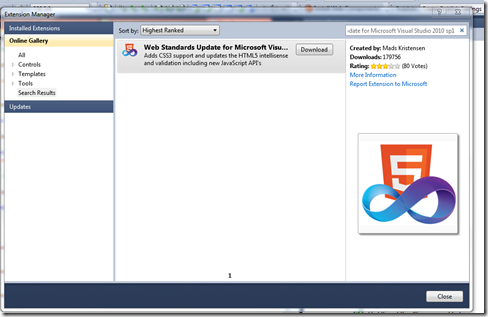
    Click on the Tools Menu => Extension Manager => Select Online Extensions => Search for “Web Standards Update for Microsoft Visual Studio 2010 sp1” and install the extension.

    if you have already installed the extension, run the setup and repair it.

    in my case it happened after I installed MVC4 beta. and althogh I had already had the extension installed it was not opening CSS files and repairing the extension fixed it.

    Written by vahid

    Monday, March 5, 2012 at 4:02 AM

    Tagged with , ,